
Screenshots
About Control Center--iOS15&Android
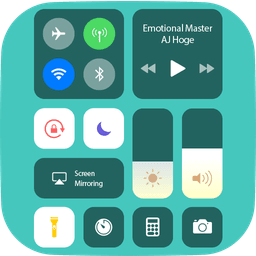
Control Center--iOS15&Android brings iPhone-style control panels to your Android device. Access all essential functions with a single swipe—just like on iOS. This free, lightweight app delivers the convenience of iPhone controls without cluttering your home screen.
Swipe from the edges of your screen or tap the top to open the control panel instantly. Close it just as easily with a downward swipe or by pressing Back, Home, or Recent buttons. The streamlined interface puts frequently used tools within reach in seconds.
Screen recording captures your device activity effortlessly—perfect for tutorials, gameplay, or sharing moments with others. The QR code scanner lets you instantly read codes without opening a separate app. Your camera is one tap away for spontaneous photos, while the flashlight provides quick illumination when you need it.
Manage audio and media directly from the control panel: play, pause, and adjust volume for your favorite songs without leaving your current app. Control Bluetooth connectivity to pair with headphones, car kits, and other wireless devices. Toggle Wi-Fi on or off to manage your internet connection instantly. Airplane Mode lets you disable Bluetooth, Wi-Fi, and cellular connections all at once—useful for flights or focused work sessions.
Handle your display settings effortlessly. Adjust brightness from any screen to suit different lighting conditions. Lock screen rotation to prevent accidental flips, or enable it for full-screen flexibility. Set custom screen timeout periods ranging from 15 seconds to 30 minutes to balance responsiveness with battery life—the screen stays active only as long as you need.
Time and alarm management is seamless: set alarms, timers, and check time zones for other regions. Silence mode mutes calls, alerts, and notifications when your device is locked, giving you control over interruptions. Use the built-in calculator for quick math without hunting through your app drawer.
Personalize your control panel to match your style. Adjust the size, colors, and background to suit your preferences. Whether you prefer a minimalist aesthetic or bold colors, this app adapts to your taste.
Control Center--iOS15&Android has been tested on Samsung, OPPO, VIVO, Xperia, Xiaomi, LG, OnePlus, Huawei, and other Android devices. Works smoothly across the latest models and older phones alike. Download Control Center--iOS15&Android today and experience iOS-style efficiency on your Android phone.
Pros & Cons
Pros
- Quick access to essential settings via edge swipe or top tap
- Screen recording, QR scanner, and flashlight built into control panel
- Customizable colors, size, and background to match your preferences
- Lightweight app that doesn't clutter your home screen
Cons
- Free app likely supported by ads, which may interrupt workflow
- Replicates iOS features on Android, so some controls may behave differently
- Requires edge-swipe gestures that may conflict with existing Android navigation
- Device compatibility varies despite testing on multiple brands
Related Apps

AlienGUIse
Desktop themes and manager for Windows — transform your system with 5 futuristic designs.

SharpKeys
Remap keyboard keys to launch apps, media controls, and custom commands on Windows.

RocketDock
Desktop launcher for Windows — quick access dock with customizable icons and positioning.

Custom Resolution Utility (CRU)
Display resolution utility: Create custom resolutions for your monitor with precise refresh rate control.

Lagguy Wallpapers
Lagguy
4K & HD wallpapers for Android — minimal, abstract, nature, AMOLED designs with lifetime access

Lock Screen OS
Apps Genz
Customize your lock screen with widgets, photos, and notifications. Replace Android's default lock screen.
Latest Articles

Melhores alternativas ao Six Flags em 2026 (testamos 7)
Jul 22, 2026

Os melhores aplicativos de orientação fotográfica com IA para iPhone em 2026
Jul 21, 2026
Os melhores aplicativos de dev container para desktop em 2026 (testamos 8)
Jul 21, 2026

Melhores jogos RPG steampunk para desktop em 2026
Jul 21, 2026
Melhores apps para streaming de jogos Steam sem monitor no desktop em 2026 (testamos 8)
Jul 21, 2026